The Liene M200 review comes down to a useful combination: dye-sublimation 4×6 printing, a built-in rechargeable battery, and a dedicated Wi-Fi hotspot for connecting devices.
It suits people who want to print phone photos at home or away, provided they are comfortable carrying photo paper and a cartridge for the trip.
Liene M200 Review Summary
The quick verdict

500+ ratings
Read Amazon ReviewsLiene M200
A good fit for phone photographers who want full-size 4×6 prints at home or while traveling, with a built-in battery and app-based editing.
- Dye-sublimation color printing applies three primary colors in layers, followed by a protective top layer.
- Prints measure 4×6 inches and use glossy photo paper.
- The rechargeable built-in battery supports up to 40 prints per charge; the printer can also be used with its power adapter.
- A built-in Wi-Fi hotspot enables a direct connection, and up to five users can connect at the same time.

Pros
- Battery operation gives it flexibility for travel, parties, and rooms without a convenient outlet.
- The built-in hotspot offers a direct way to connect without relying on a home network.
Consider before buying
- The included paper supply is 20 sheets, so frequent printing means planning for additional paper and cartridges.
- The stated battery capacity is up to 40 prints per charge, so longer print sessions may call for access to the power adapter.
Read the full review summary
The M200 is designed to turn smartphone and computer photos into standard 4×6 prints without relying on a home network.
Its built-in hotspot provides a direct connection, and the battery edition can print without a power cord; Liene gives a maximum of 40 prints per charge.
A package with 20 sheets and one cartridge gets a new owner started, while the app offers basic edits, filters, and borders.
This is most appealing for family snapshots, travel albums, celebrations, and other occasions when a physical print is more useful than another image on a phone. Its stated output size and print-only design keep the job focused.
Buyers who expect frequent batches should consider how often they will replenish paper and cartridges, and those planning to share the printer can use its support for up to five simultaneous connections.
The buying factors
Liene M200 Scorecard
Editorial scores reflect listed features and buyer fit; they are not laboratory measurements or customer ratings.
Print format
The dedicated 4×6 format is a practical size for albums and frames, though the product data focuses on that size rather than a range of formats.
On-the-go use
A built-in battery and compact form support portable use; the stated maximum is 40 prints per charge.
Connection flexibility
A built-in Wi-Fi hotspot avoids dependence on a home network, and up to five users can connect at once.
App editing
The app includes basic editing, filters, and borders, useful for simple adjustments before printing.
Print protection
The final protective layer is designed to help prints resist water, scratches, and fading.
Ready-to-use supplies
The included 20 sheets and one cartridge provide a starting supply, so regular printing will require replenishment.
Key Features and Specifications of Liene M200
- Dye-sublimation color printing applies three primary colors in layers, followed by a protective top layer.
- Prints measure 4×6 inches and use glossy photo paper.
- The rechargeable built-in battery supports up to 40 prints per charge; the printer can also be used with its power adapter.
- A built-in Wi-Fi hotspot enables a direct connection, and up to five users can connect at the same time.
- Compatibility includes iOS, Android, laptops, and PCs.
- The Liene app provides basic photo editing, filters, and borders, and can report when paper or a cartridge runs out.
- The package includes 20 sheets of photo paper, one ink cartridge, and a power adapter.
Pros and Cons of Liene M200
Pros
- Battery operation gives it flexibility for travel, parties, and rooms without a convenient outlet.
- The built-in hotspot offers a direct way to connect without relying on a home network.
- Standard 4×6 prints work naturally for albums and many common frames.
- The protective finishing layer is intended to guard prints against water, scratches, and fading.
- The included app provides simple creative edits before printing.
Consider before buying
- The included paper supply is 20 sheets, so frequent printing means planning for additional paper and cartridges.
- The stated battery capacity is up to 40 prints per charge, so longer print sessions may call for access to the power adapter.
- The product details center on 4×6 glossy prints and print-only use, which may not suit someone seeking multiple output sizes or an all-in-one device.
Who Should Buy Liene M200?
Good fit
Consider the M200 if you regularly want physical copies of phone photos but do not want printing tied to your home Wi-Fi.
Its hotspot connection and compatibility with iOS and Android make it a practical shared option for a household or small gathering, with up to five users able to connect at once.
The battery edition is especially relevant for travel or events where an outlet may not be close by.
The 40-print maximum per charge gives a clear planning point: estimate how many photos you expect to print, and bring the adapter if a larger session could exceed that.
It also fits buyers who want a simple creative step before making a print.
The app’s basic editing, filters, and borders can help prepare an image, while the protective finish is designed to help the result hold up to ordinary handling.
Who should skip it
Look elsewhere if your routine depends on printing formats other than 4×6, or if you want scanning or copying in the same device. The M200 is described as a print-only photo printer focused on glossy 4×6 output.
It may be less convenient for high-volume printing away from home if carrying supplies and keeping the battery charged does not suit your routine.
Check how much paper and cartridge capacity your typical outing requires before choosing a portable setup.
How the Liene M200 Fits Everyday Photo Printing
A standard size for physical photo keepsakes
The 4×6 output gives the M200 a clear purpose: making prints for albums, display, or sharing. Dye-sublimation builds color in layers and adds a protective final layer, a design intended to help prints resist water, scratches, and fading.
That focus is useful when most of your printing starts with phone snapshots and ends with a familiar photo size.
Printing away from a home network
The built-in Wi-Fi hotspot is central to the M200’s flexibility.
A direct connection can make it easier to print in places where a home router is unavailable or inconvenient, while the stated support for up to five simultaneous users can suit a group sharing the printer.
The included power adapter offers another way to operate it when portability is not the priority.
Battery capacity and travel planning
A rechargeable battery separates this edition from a setup that always needs to stay plugged in.
Liene gives a maximum of 40 prints per charge, so the practical fit depends on the size of the batch you expect to make.
For a small set of keepsakes, that allowance may suit an outing; for a larger event, bringing the adapter and enough replacement supplies is a sensible plan.
A simple app-led workflow
The accompanying app provides basic editing along with filters and borders, keeping straightforward photo adjustments close to the printing process. Its paper and cartridge alerts can also help users notice when supplies run out.
Buyers who rely on particular editing or device workflows should confirm those meet their needs before settling on an app-based printer.
Alternatives to Liene M200
Desktop Photo Printers alternative

19,000+ ratings
Read Amazon ReviewsKODAK Dock Plus 4×6 Photo Printer
Choose the M200 if battery-powered printing and a direct hotspot matter for printing away from home.
The Dock Plus is a better fit for a stationary home setup if you value a phone dock that also charges the device while printing.
- The KODAK Dock Plus prints 4×6 photos using 4PASS dye-sublimation and includes an integrated smartphone docking station that charges a connected phone.
- It is designed as a desktop printer that connects to a power outlet and uses Bluetooth with the KODAK app.
- The Liene M200 pairs 4×6 dye-sublimation printing with a built-in battery, direct Wi-Fi hotspot, and support for up to five simultaneous users.
Desktop Photo Printers alternative
800+ ratings
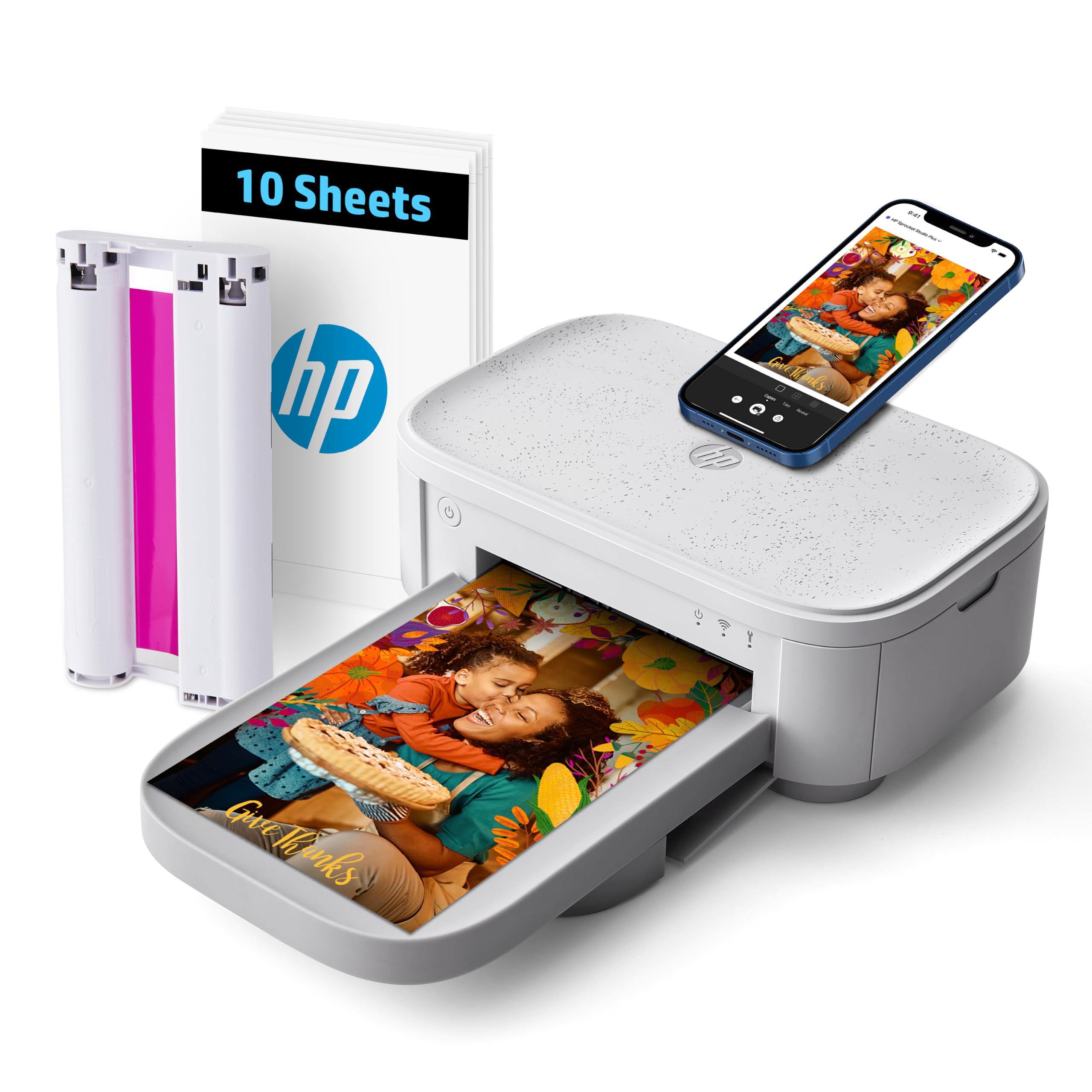
Read Amazon ReviewsHP Sprocket Studio Plus
The M200 better matches buyers who want a battery-equipped printer for home and travel. Consider the HP if creative app formats such as collages and photobooth pictures matter more than the M200’s stated portable battery setup.
- The HP Sprocket Studio Plus is a compact home-focused 4×6 dye-sublimation printer with Wi-Fi connection through its app.
- Its listed creative features include stickers, frames, filters, collages, photobooth pictures, and photo IDs.
- The Liene M200 is built around 4×6 prints and adds a rechargeable battery for printing without a power cord.
Is Liene M200 Worth It?
The Liene M200 is worth considering if you want glossy 4×6 prints from a phone or computer and value the option to print without an outlet.
Its built-in hotspot and battery give it useful flexibility for home use, trips, and shared photo sessions.
Before buying, make sure its focused 4×6 format, app-led workflow, and ongoing paper and cartridge needs suit your habits.
The stated maximum of 40 prints per charge is a helpful planning guide, and the included adapter provides a wired option for longer sessions.
Your review at a glance
500+ ratings
Read Amazon ReviewsLiene M200
A good fit for phone photographers who want full-size 4×6 prints at home or while traveling, with a built-in battery and app-based editing.
- Dye-sublimation color printing applies three primary colors in layers, followed by a protective top layer.
- Prints measure 4×6 inches and use glossy photo paper.
- The rechargeable built-in battery supports up to 40 prints per charge; the printer can also be used with its power adapter.
- A built-in Wi-Fi hotspot enables a direct connection, and up to five users can connect at the same time.